

222rs game register
222RS Game Register – Complete Step-by-Step Registration Guide
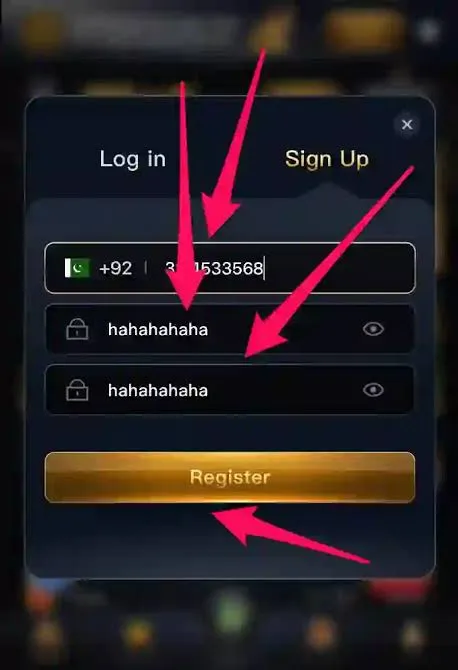
Table of Contents
How to Register 222RS Game – Complete Registration Guide 2026
Welcome to our complete guide on How to Register 222RS Game. If you want to learn about the account creation process, this article will help you understand the general registration steps. Creating an online account usually requires some basic information, a valid mobile number, and a secure password. Whether you are new to online gaming platforms or simply looking for registration information, this guide explains the requirements, account setup process, verification steps, and important security tips.
What Is 222RS Game?
222RS Game is an online gaming platform that users may access through a compatible website or application. Before creating an account, users should understand the available services and platform requirements. It is important to read the official terms and conditions, privacy policy, and account rules. Users should also confirm that the service is legally available in their location and meets the applicable age requirements.
Requirements for 222RS Game Registration
Before starting the 222RS Game registration process, prepare the basic information that may be required by the platform. Having the necessary details ready can make the account setup process easier.
- A smartphone, tablet, or computer.
- A stable internet connection.
- A valid mobile number, if required.
- A secure and unique account password.
- Required account verification information.
- Eligibility under the platform’s age and location rules.
How to Register 222RS Game Step by Step
Step 1: Visit the Official Website
First, open an updated browser on your smartphone or computer. Enter the verified 222RS Game website address in the browser. Carefully check the website address before continuing. Avoid suspicious links and unofficial websites that may request unnecessary personal information.
Step 2: Find the Register Button
After opening the homepage, look for the Register or Sign Up button. It may appear in the website’s main menu or at the top of the homepage. Select this option to open the account registration section. Read any instructions displayed on the registration page.
Step 3: Enter Your Basic Information
The registration form may ask you to provide basic details, such as a username or mobile number. Enter the requested information carefully. Make sure your details are accurate and belong to you. Incorrect information may create difficulties during future account verification or recovery.
Step 4: Create a Strong Password
Choose a strong and unique password for your account. A good password should contain uppercase letters, lowercase letters, numbers, and special characters. Avoid simple passwords such as your name, date of birth, or common number combinations. Do not reuse passwords from other websites.
Step 5: Complete Account Verification
Some online platforms may require mobile number verification before completing registration. If the official website provides a verification process, follow the instructions carefully. Enter a verification code only on the verified website. Never share your OTP or security code with anyone.
Step 6: Review Your Registration Details
Before submitting your registration information, check all the details carefully. Make sure your username, mobile number, and other required information are correct. Read the platform’s privacy policy and terms and conditions so you understand how your information and account may be used.
Step 7: Complete the Registration Process
Once you have reviewed the information, follow the official instructions to submit your registration request. If the platform accepts your details, it may display an account confirmation message. Keep your login information secure so you can use the official account recovery process if needed.
Important Registration Reminder
Always verify the website before registering. Never share your password, OTP, or private information with strangers. Check the platform’s legitimacy and applicable rules before creating an account.
Common 222RS Game Registration Problems
Mobile Number Already Registered
If you receive a message that your mobile number is already registered, you may have an existing account. Check whether you previously signed up and use the official recovery option if necessary.
Verification Code Not Received
Check your mobile network and confirm that you entered the correct number. Wait a few moments before requesting another verification code. Do not share received codes with anyone.
Registration Page Not Opening
Sometimes a registration page may not load because of an internet or browser issue. Check your connection, refresh the page, clear your browser cache, and try an updated browser.
Important Safety Tips for New Users
Protecting your personal information should always be a priority. Create a unique password and avoid using public computers for account registration. Never open suspicious links or download unknown applications. If a website asks for unusual personal or payment information, stop and verify its authenticity first.
Online gaming platforms involving deposits or real-money rewards can carry financial risks. Before participating, check licensing, local laws, age requirements, payment rules, and withdrawal conditions. Never deposit money you cannot afford to lose.
Conclusion
We hope this detailed guide on How to Register 222RS Game has helped you understand the general account registration process. From visiting the official website to reviewing your information and completing verification, each step should be handled carefully. Always use a verified website, protect your account details, and read the platform’s rules before using its services.
For more information and helpful gaming guides, visit our website: 222RS Game.