

How to Withdraw in 222RS Game
How to Withdraw in 222RS Game – Complete Step-by-Step Guide
Table of Contents
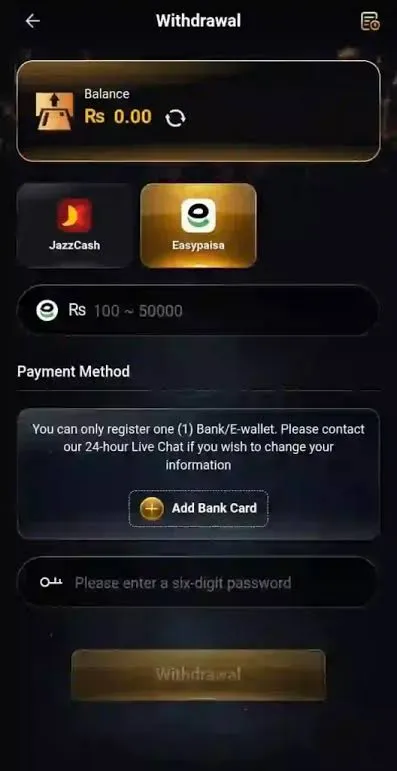
How to Withdraw in 222RS Game – Complete Withdrawal Guide 2026
Welcome to our complete guide on How to Withdraw in 222RS Game. If you want to understand the withdrawal process, this article will explain the general steps and important information you should know before requesting a payment. Online gaming platforms may have different withdrawal rules, payment methods, and verification requirements. Therefore, it is important to understand the official instructions before submitting a withdrawal request.
What Is 222RS Game Withdrawal?
222RS Game withdrawal refers to the process of requesting a transfer of an eligible account balance through a payment method supported by the platform. Depending on the service, available payment options, minimum withdrawal amounts, processing times, and verification requirements may differ. Always check the official payment policy before making a request.
Requirements Before Withdrawing
Before starting the 222RS Game withdrawal process, review the following requirements:
- Access to your registered account.
- Your correct account login information.
- A verified payment account, if required.
- Completion of any required identity verification.
- Sufficient eligible balance according to platform rules.
- Knowledge of the minimum withdrawal limit and fees.
- Access to the platform’s official payment instructions.
How to Withdraw in 222RS Game Step by Step
Step 1: Open the Official Website
First, open a trusted internet browser on your mobile phone or computer. Visit the verified 222RS Game website and check the website address carefully. Avoid unofficial links and suspicious websites that may attempt to collect your personal or payment information.
Step 2: Login to Your Account
Find the Login button on the homepage and enter your registered username or mobile number along with your password. Review your details before continuing. If you cannot access your account, use the official account recovery option if available.
Step 3: Find the Withdrawal Section
After accessing your account, look for the Wallet, Payments, or Withdrawal section if available. Open this section to review the withdrawal instructions and supported payment options. The exact menu names may vary depending on the platform.
Step 4: Check Your Available Balance
Before submitting a withdrawal request, review your account balance. Make sure the amount you want to withdraw meets the platform’s eligibility requirements. Check for any minimum balance, bonus conditions, transaction fees, or other restrictions.
Step 5: Review the Payment Method
Check which payment methods are officially supported by the platform. Use only a payment account that belongs to you and is eligible under the platform’s rules. Carefully verify the account details before submitting any payment request.
Step 6: Enter the Withdrawal Amount
If the platform allows withdrawals, enter an eligible amount according to its official payment rules. Review the amount carefully and check whether any processing fees or other charges apply before continuing.
Step 7: Submit and Track Your Request
Follow the official instructions to submit your withdrawal request. If a confirmation message or transaction reference is provided, keep it for your records. You can check the request status through the official account dashboard or contact customer support if assistance is needed.
Never share your password, OTP, PIN, or banking details with strangers. Do not pay unexpected fees or send additional money to someone promising to release a withdrawal. Verify all payment conditions through official support.
Common 222RS Game Withdrawal Problems
Withdrawal Request Pending
A withdrawal may remain pending because of processing time, account verification, or payment provider delays. Check the official processing policy and contact support if the request takes longer than the stated period.
Incorrect Payment Details
If your payment information is incorrect, the transaction may fail or be delayed. Review your details carefully and contact official support for guidance before submitting another request.
Minimum Withdrawal Limit
Some platforms set a minimum withdrawal amount. If your eligible balance does not meet the required limit, review the official withdrawal conditions before trying again.
Account Verification Problems
Some services require identity or account verification before processing payments. Follow only the official verification instructions and avoid sending personal documents through unofficial channels.
Tips for Safe Withdrawals
Always use the verified website and check payment rules before requesting a withdrawal. Keep transaction records, protect your account password, and never share confidential payment information. If something seems suspicious, stop the transaction and contact official customer support.
Online gaming involving deposits or real-money rewards carries financial risks. Check applicable local laws, platform licensing, age requirements, and payment policies. Never deposit money you cannot afford to lose.
Conclusion
We hope this guide on How to Withdraw in 222RS Game has helped you understand the general withdrawal process. Before submitting a request, check your eligible balance, payment information, verification requirements, and official withdrawal conditions. Always protect your personal information and use trusted support channels for assistance.
For more information and helpful guides, visit our website: 222RS Game.